
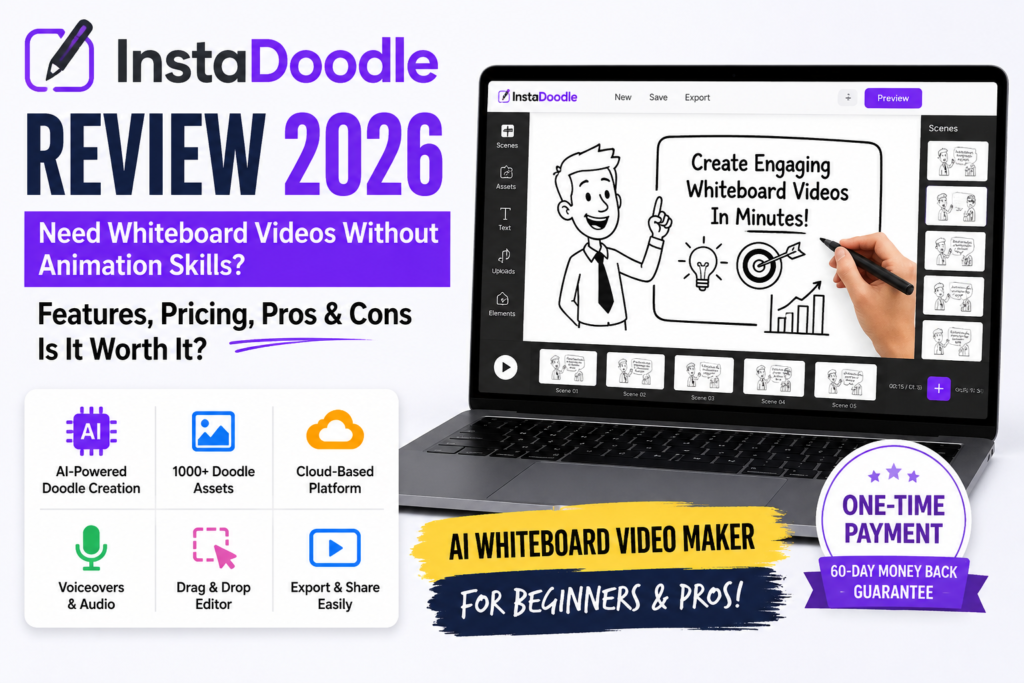
InstaDoodle Review 2026: Can You Really Create Whiteboard Videos With AI?
If you’ve ever tried to create an explainer video for your business, YouTube channel, online course, or website, you know how time-consuming the process can become. You need a script, visuals, animation, voice-over, and editing. Hiring a professional video creator can also be expensive, especially if you’re a small business owner or independent creator.
That’s where AI-assisted video creation tools come in. InstaDoodle is marketed as a tool that helps users create whiteboard-style animated videos without needing advanced animation or video-editing skills.
But is InstaDoodle worth buying in 2026? Can it help beginners produce useful explainer videos, or should you consider another video creation tool?
In this InstaDoodle review, we’ll examine its intended use, advertised features, pricing, potential benefits, limitations, and who might find it useful. We’ll also explain what to check before purchasing so you can make a more informed decision.
Affiliate Disclosure: This article contains affiliate links. If you purchase through our links, TechReviewLabs may earn a commission at no additional cost to you. This does not influence our editorial assessment.
Editorial Note: This article discusses the product based on its advertised positioning and available offer information. We have not independently verified every feature or performance claim. Check the current sales page for the latest inclusions, pricing, and terms before purchasing.
Quick Verdict: Is InstaDoodle Worth Considering?
InstaDoodle may be worth considering if your main requirement is whiteboard animation.
InstaDoodle is aimed at people who want to create whiteboard-style videos without building animations entirely from scratch. This format can work well for educational content, simple product explanations, tutorials, and marketing presentations.
However, a tool’s advertised features don’t automatically guarantee professional-looking results. The final quality will depend on the available assets, customization options, script, narration, and how effectively you put everything together.
InstaDoodle may be a reasonable option if you specifically want whiteboard-style videos and prefer a simpler workflow. If you need advanced editing, realistic AI-generated footage, or sophisticated motion graphics, compare it with other tools before deciding.
Check the current InstaDoodle offer: View InstaDoodle’s offer here
What Is InstaDoodle?
InstaDoodle is marketed as an AI-assisted whiteboard video creation tool. Its main purpose is to help users produce videos built around the familiar whiteboard animation style, where illustrations and visual elements appear as if they are being drawn on a screen.
This format is often used to explain concepts, demonstrate processes, teach lessons, or introduce products and services.
For example, a small business could use a whiteboard video to explain how its service works. A teacher might use one to introduce a difficult topic, while a content creator could use it to make an educational video.
The key distinction is that whiteboard animation is not the same as generating a realistic video from a text prompt. If your goal is animated explanations rather than cinematic AI footage, a specialized whiteboard tool may be more relevant.
Before purchasing InstaDoodle, confirm which parts of the process it automates and which still require your own input.
Who Is InstaDoodle Designed For?
InstaDoodle may appeal to several types of users.
1. Small Business Owners
Small businesses often need videos to explain their services, answer customer questions, and introduce products. Whiteboard animation can simplify information that would otherwise require a lengthy written explanation.
For example, a bookkeeping business could create a short video explaining its monthly service process.
2. YouTube Content Creators
Creators producing educational, tutorial, or explainer content may find whiteboard-style visuals useful. These videos can provide a visual structure for topics that are difficult to communicate through narration alone.
However, the tool itself won’t guarantee YouTube views, audience retention, or monetization. Those depend on the topic, script, presentation, and audience demand.
3. Teachers and Online Course Creators
Teachers and course creators can use illustrated explanations to break down complicated subjects into smaller, easier-to-follow steps.
Before using a tool for a complete course, check its export options, licensing terms, and whether its available visual assets fit your subject.
4. Freelancers and Marketing Agencies
Freelancers may want to create explainer videos for clients. Agencies could also explore whiteboard animation as an additional service.
But if you plan to sell videos commercially, confirm the product’s current commercial-use rights and any limitations that apply to the plan you purchase.
Who Might Not Need InstaDoodle?
InstaDoodle may not be the right fit if you mainly want realistic AI-generated scenes, advanced timeline editing, detailed cinematic effects, or a complete professional video-editing suite.
It may also be unnecessary if you only need an occasional basic video and already have a tool that meets your requirements.
How Does InstaDoodle Work?
The intended workflow for a whiteboard video tool generally involves several stages. The exact workflow and automation available in InstaDoodle should be confirmed on its current product page.
Step 1: Plan Your Video
Start with a clear objective. Decide what viewers should learn, understand, or do after watching the video.
A useful explainer video usually focuses on one main idea rather than trying to cover an entire subject at once.
Step 2: Prepare Your Script
Write a short script that introduces the problem, explains the main points, and finishes with a clear conclusion or call to action.
Even if a tool offers AI assistance, review the generated text for accuracy, clarity, and natural wording.
If you’re also exploring ways to streamline written content production, read our guide to AI tools that write and publish SEO content automatically. It covers a related application of AI, although writing SEO content and creating whiteboard videos serve different purposes.
Step 3: Build the Visual Sequence
Whiteboard videos typically use illustrations, icons, text, or other visual elements to support the narration.
Check whether InstaDoodle offers the specific visual assets and customization options you need. Don’t assume that every asset, animation, or editing feature is included in every plan.
Step 4: Add Narration and Timing
Narration can help viewers follow the story, while timing determines whether each visual appears at the right moment.
Confirm which voice-over options are available and whether you can upload your own audio if that matters for your workflow.
Step 5: Review and Export
Watch the complete video before publishing it. Check for spelling mistakes, awkward timing, distracting visuals, unclear narration, and unsupported claims.
A video that is easy to create isn’t necessarily ready to publish. Final review remains important, particularly for business and educational content.
InstaDoodle Features: What Should You Look For?
When evaluating InstaDoodle, focus on the features that affect your actual workflow rather than relying on broad marketing promises.
Whiteboard-Style Animation
Whiteboard animation is the central use case. It can help present information through illustrations and progressive visual explanations.
The important question is whether the available animation styles and assets match the type of videos you want to create.
AI-Assisted Creation
AI assistance may reduce some manual work, depending on the features included in the current version.
However, the phrase “AI-powered” can describe very different capabilities. Check whether AI helps with scripting, scene creation, visual selection, voice-over, or another specific task. Don’t assume the tool automates the entire video production process.
Customization Options
Customization matters if you want your videos to reflect your brand. Look for control over text, colors, visual elements, scene order, and other relevant settings.
The precise options available should be checked against the current plan details.
Voice-Over and Audio
Narration can make an explainer video easier to understand. If audio is important to your project, confirm whether the product includes built-in voices, voice customization, audio uploads, or other features you need.
Also check any limitations on voice usage, export formats, or commercial projects.
Export and Usage Rights
Before buying any video creation tool, confirm the supported export formats, video resolution, project limits, and usage rights.
These details are especially important if you intend to publish on YouTube, use videos in paid advertising, or create videos for clients.
InstaDoodle Pricing: Is It Affordable?
The offer information referenced for this review lists two price points:
| Plan or offer | Referenced price |
|---|---|
| Basic offer | $37 |
| Color plan | $67 |
These are reference prices, not a guarantee of the current checkout price. Offers can change, and the exact inclusions may differ. Verify the final price, plan names, taxes, optional upgrades, and recurring charges on the official checkout page before purchasing.
Is the $37 Option Enough?
The lower-priced option may be worth considering if it includes the essential features you need for your intended projects.
Before choosing it, check the number of videos or projects allowed, available assets, export quality, and any restrictions that could affect your workflow.
A lower upfront price isn’t necessarily better value if you later discover that an essential feature is unavailable.
Is the $67 Color Plan Worth It?
The referenced $67 option is described as a color plan. Whether it is worth paying more depends on the actual difference between the plans and the type of videos you want to produce.
Compare the included features side by side. If the additional option provides visual flexibility that genuinely matters to your projects, the higher price might make sense. If it doesn’t solve a real requirement, paying extra may not be necessary.
Before you buy: Check the current InstaDoodle pricing and plan details
Don’t Forget Potential Extra Costs
The initial price doesn’t always tell you the full cost of using a product. Check whether any optional upgrades, additional assets, subscriptions, or third-party services are required for your intended use.
If you plan to use InstaDoodle regularly, calculate the total cost against the number of videos you expect to create.
InstaDoodle Pros and Cons
Here is a practical assessment of the potential benefits and limitations to consider.
Potential Pros
- Specialized format: Whiteboard animation can be useful for educational and explanatory content.
- Beginner-oriented use case: A dedicated tool may be easier to approach than a complex professional animation suite.
- Potential time savings: Templates or automation may reduce some repetitive production work, depending on the features included.
- Useful for multiple content types: Explainer videos can support tutorials, presentations, training, and marketing.
- Accessible price point: The referenced $37 and $67 prices may be attractive to some buyers, provided the current offer and included features match expectations.
Potential Cons
- Limited use case: Whiteboard animation isn’t the ideal format for every video project.
- Feature uncertainty: Advertised AI capabilities should be checked against the actual product and plan.
- Results still require effort: A weak script or poorly organized explanation can produce an ineffective video, even with automation.
- Possible plan restrictions: Assets, exports, usage rights, or other features may vary by plan.
- Value depends on usage: Someone who creates only one or two videos may not get as much value as a regular creator.
These points are considerations for evaluating the product, not claims that every user will experience the same results.
InstaDoodle vs. Traditional Video Editing Software
InstaDoodle and traditional video editors serve different purposes.
A whiteboard-focused tool is most relevant when you want illustrated explanations. A general-purpose video editor is usually more flexible for cutting footage, arranging clips, balancing audio, adding transitions, and building a wide range of video styles.
| Requirement | Whiteboard-focused tool | General-purpose editor |
|---|---|---|
| Illustrated explanations | A natural use case | Often requires more manual setup |
| Footage editing | Check available capabilities | Usually a core function |
| Cinematic effects | May not be the main focus | Often offers greater flexibility |
| Beginner workflow | Depends on the product | Varies by software |
| Best choice | Focused whiteboard projects | Diverse video-editing needs |
This is a general category comparison, not a claim that InstaDoodle has been tested against every video editor.
Choose based on the work you need to do. A specialized tool can be convenient for a narrow task, while a broader editor can make more sense when your projects involve many different formats.
InstaDoodle vs. Doodly
People searching for whiteboard animation software may also compare InstaDoodle with Doodly.
Rather than assuming one is better, compare the current versions on the criteria that affect your work:
- Ease of use: How quickly can you create and revise a video?
- Assets and styles: Are the illustrations and animation styles suitable for your subject?
- Customization: Can you make the video look the way you want?
- Audio options: Does the tool support your preferred narration workflow?
- Export quality: Does the output meet your publishing requirements?
- Commercial rights: Are you allowed to use the videos for your intended business or client work?
- Total price: What is included in the initial purchase, and are there additional costs?
Product features and pricing can change, so compare the current official offer pages before making a decision. Without a verified, side-by-side test, it would be misleading to declare a universal winner.
Can You Use InstaDoodle for YouTube Videos?
Potentially, yes—if whiteboard animation suits the content you’re creating and the product’s current licensing and export options meet your needs.
Educational videos, tutorials, and simple explainers can benefit from clear illustrations. However, a video creation tool doesn’t automatically make content engaging or successful.
For a stronger YouTube video:
- Choose a specific topic that viewers want to understand.
- Open with the question or problem the video will solve.
- Keep the script focused and avoid unnecessary filler.
- Use visuals to clarify the explanation rather than simply decorate the screen.
- Check the narration, pacing, and visual timing.
- Use original, accurate information and review the final video before publishing.
You should also review the platform’s current monetization rules and ensure that your content provides meaningful value. Using an AI-assisted tool by itself does not guarantee monetization approval, views, or revenue.
Creating videos is only one part of building an online presence. If you want to understand how content can gain visibility in AI-powered search, read our guide on getting cited by ChatGPT and Google AI Overviews in 2026. Video creation and search visibility are different challenges, but both can matter to an online content strategy.
Is InstaDoodle Useful for Small Businesses?
For some businesses, a short explainer video can make a service easier to understand. For example, a software company could explain its onboarding process, a consultant could outline a service, or a training provider could illustrate a procedure.
The main question is whether the finished video helps your audience understand the offer.
Before investing, consider creating a short sample project using the workflow and features available to you. Evaluate the time required, the quality of the output, and whether the format suits your customers.
If you need a complete marketing strategy, advanced video production, or multiple content formats, InstaDoodle alone may not cover every requirement.
If your business website also needs better search visibility, our Screpy review: an affordable SEO tool for small businesses explains what to consider when evaluating an SEO tool. Screpy focuses on website SEO rather than whiteboard video creation, so it addresses a different part of your marketing workflow.
Related Reading
If you’re exploring tools for content creation and online marketing, these guides may also help:
- AI Tool That Writes and Publishes SEO Content Automatically
- How to Get Cited by ChatGPT and Google AI Overviews in 2026
- Affordable SEO Tool for Small Businesses: Screpy Review
These resources cover related areas of online marketing and content creation, although they address different needs from whiteboard animation.
Is InstaDoodle Legit?
InstaDoodle is marketed as an AI-assisted whiteboard video creation tool and is sold through ClickBank, a digital product marketplace. ClickBank is a marketplace, not an endorsement of the product’s quality or results.
A marketplace listing alone does not prove that a product will meet your expectations. Before purchasing, review the product description, the exact features included, the seller’s terms, and the checkout information.
You should also confirm that the checkout page is the one you intended to visit and that the product name and price match the offer you are evaluating.
Be cautious about any marketing claims that promise guaranteed income, viral videos, effortless business growth, or results without meaningful work. Video software can support a workflow, but it cannot guarantee the outcome of a marketing campaign.
InstaDoodle Refund Policy: What Should You Check?
The offer information referenced for this review mentions a 60-day guarantee. Verify the current refund period and conditions on the official checkout page before purchasing. Do not rely on a guarantee mentioned in an older promotion if the current offer states something different.
Before you buy, check:
- Whether the guarantee applies to the exact plan you’re purchasing.
- The number of days allowed to request a refund.
- How a refund request must be submitted.
- Whether any exceptions or conditions apply.
- Which seller or support contact handles the request.
Keep your order confirmation and a copy of the terms presented at checkout. If you decide to request a refund, follow the current official instructions and keep a record of your request.
Is InstaDoodle Worth It?
The practical recommendation is to consider InstaDoodle for simple whiteboard animation, but verify the features and terms before purchasing.
It may be worth considering if you regularly create educational explanations, tutorials, training materials, or marketing videos and want a tool focused on this format.
It may be less suitable if your main priority is realistic AI video generation, advanced editing, cinematic effects, or a broad professional production workflow.
Before buying, ask yourself three questions:
- Will I use whiteboard animation regularly? If not, a purchase may be difficult to justify.
- Does the current plan include the features I need? Check exports, assets, customization, and usage rights.
- Does the total cost make sense for my projects? Consider the upfront price and any additional expenses.
If the answer to these questions is yes, InstaDoodle may be worth investigating further. If you’re unsure, compare it with alternatives before committing.
Review the current InstaDoodle offer and terms
Frequently Asked Questions About InstaDoodle
What is InstaDoodle used for?
InstaDoodle is marketed as an AI-assisted whiteboard video creation tool. Its intended use includes producing illustrated explainer videos and other whiteboard-style content. Confirm the current feature list to understand exactly what the software can do.
How much does InstaDoodle cost?
The offer information referenced for this review lists prices of $37 for a basic offer and $67 for a color plan. These prices may change, so check the current checkout page for the final price and plan inclusions.
Is InstaDoodle beginner-friendly?
It is marketed toward users who want to create whiteboard videos without advanced animation skills. However, ease of use depends on the actual interface, available guidance, and the complexity of the project. Review the current product demonstration before buying.
Can I use InstaDoodle for YouTube?
It may be suitable for YouTube videos if the whiteboard format fits your content and the current plan permits your intended use. Check export settings and licensing terms. The software does not guarantee views, monetization, or audience growth.
Is InstaDoodle better than Doodly?
There is no universal answer without comparing the current versions. Evaluate ease of use, visual assets, customization, audio options, export quality, licensing, and total cost against your specific needs.
Does InstaDoodle include AI features?
InstaDoodle is marketed as an AI-assisted tool, but the exact AI functions—such as scripting, scene creation, visual selection, or voice-over—should be verified on the current offer page.
Does InstaDoodle offer a money-back guarantee?
The offer information referenced here mentions a 60-day guarantee, but you should verify the current refund policy and eligibility conditions before purchasing. The terms shown for your order should take priority.
Is InstaDoodle suitable for commercial projects?
That depends on the usage rights included with the current plan. Check the license before using videos in client work, paid advertisements, or commercial projects.
Final Verdict: Should You Buy InstaDoodle in 2026?
InstaDoodle is worth considering if your main goal is to create whiteboard-style explainer videos and you want a tool built around that format.
Its potential value depends on the features actually included, the quality of the available assets, the time it saves you, and whether whiteboard animation fits your audience. The referenced $37 and $67 price points may be attractive, but the current price, plan details, and refund conditions should be verified before you purchase.
Don’t buy it simply because a sales page describes it as AI-powered. Buy it only if the actual workflow and features match a real need.
For people who regularly create tutorials, educational explanations, or simple marketing videos, it may be worth investigating. For creators who need advanced editing or realistic AI-generated footage, comparing broader video tools is likely the better first step.
Final advice: Check the current offer, confirm the terms, and make your decision based on the videos you genuinely need to create—not on promises of effortless results.


